9  Time Series Regression

Time series regression belongs to the class of supervised learning and is defined as the task of predicting a continuous target variable based on time series input data.

The github repository of sktime (accessed: 16 09 26) categorizes its implemented time series regression methods into the following categories:

Again, we observe that these categories can directly be mapped to those in Section 7.1 and Chapter 8.

An easy baseline method for time series regression is to use a \(k\)-nearest neighbors regressor with a suitable distance measure for time series, e.g. dynamic time warping. In contrast to nearest neighbor in classification, where the predicted label is determined by e.g. a majority vote of the nearest neighbors, in nearest neighbor regression the predicted value is typically computed as the average (or weighted average) of the target values of the nearest neighbors. This is implemented in sktime as KNeighborsTimeSeriesRegressor.

Also tree-based methods like random forests can be adapted for time series regression by simply taking e.g. the mean value of the target variable of the samples in a leaf node as the predicted value. This is implemented in sktime as TimeSeriesForestRegressor. Note that this is (as of v1.1.0) not a very parametrizable implementation; the only tunable parameter is the number of estimators (trees) and the minimum width of the intervals.

In this section we will have a brief look at a deep-learning based method in the context of time series regression, namely a convolutional neural network (CNN) based regressor.

9.1 Convolutional Neural Network Regressor

Convolutional Neural Networks (CNN), by design, are able to capture local patterns in time series data through the use of convolutional layers. These layers apply filters that slide over the input data, allowing the model to learn local temporal patterns that are important. At the same time, CNNs can also capture global patterns by stacking multiple convolutional layers and using pooling operations. This hierarchical structure enables the model to learn both local and global features of the time series data, making CNNs versatile for various time series tasks.

Zhao et al. (2017) propose a CNN architecture specifically designed for time series classification. The architecture consists of a series of 1D convolutional layers followed by a pooling layer. The convolutional layers are responsible for extracting local features from the time series data, while the pooling layer helps to reduce the dimensionality and capture more global patterns. After the convolutional and pooling layers, the model includes a fully connected layer (the authors refer to it as a feature layer) that maps the extracted features to \(n\) output nodes, where \(n\) is the number of classes. The node with the highest value determines the predicted class.

For regression, sktime provides CNNRegressor, which is based on the architecture described in Zhao et al. (2017). To adapt the architecture for regression tasks, the final layer is modified to have a single output node with a linear activation function that predicts a continuous value instead of class probabilities.

In this example, we will use the IEEEPPG dataset Tan et al. (2020), which focuses on heart rate monitoring during physical exercise using wrist-type photoplethysmographic (PPG) signals. The dataset consists of two PPG signals and three-axis acceleration signals. The goal is to predict ECG values from the PPG and acceleration signals. All signals were sampled at 125 Hz.

9.1.1 Imports

Code
import tempfile

import matplotlib.pyplot as plt
import numpy as np
import pandas as pd
import requests
from sklearn.metrics import root_mean_squared_error
from sklearn.preprocessing import MinMaxScaler
from sktime.datasets import load_from_tsfile_to_dataframe
from sktime.regression.deep_learning import CNNRegressor
from tensorflow.keras.optimizers import Adam
from tslearn.preprocessing import TimeSeriesScalerMinMax

np.random.seed(42)  # for reproducibility

9.1.2 Loading the dataset

Code
def download_data(url: str) -> tuple:
    """Download and load a time series dataset from a URL.

    Args:
        url: URL to the .ts file.

    Returns:
        Tuple of (X, y) DataFrames/Series.
    """
    with requests.get(url, stream=True) as r:
        r.raise_for_status()

        with tempfile.NamedTemporaryFile(suffix=".ts", delete=False) as f:
            for chunk in r.iter_content(chunk_size=8192):
                f.write(chunk)

            fp = f.name

    X, y = load_from_tsfile_to_dataframe(fp)

    return X, y


testdata_url = "https://zenodo.org/records/3902710/files/IEEEPPG_TEST.ts?download=1"
traindata_url = "https://zenodo.org/records/3902710/files/IEEEPPG_TRAIN.ts?download=1"

X_test_raw, y_test_raw = download_data(testdata_url)
X_train_raw, y_train_raw = download_data(traindata_url)

y_train_raw = y_train_raw.astype(float)
y_test_raw = y_test_raw.astype(float)

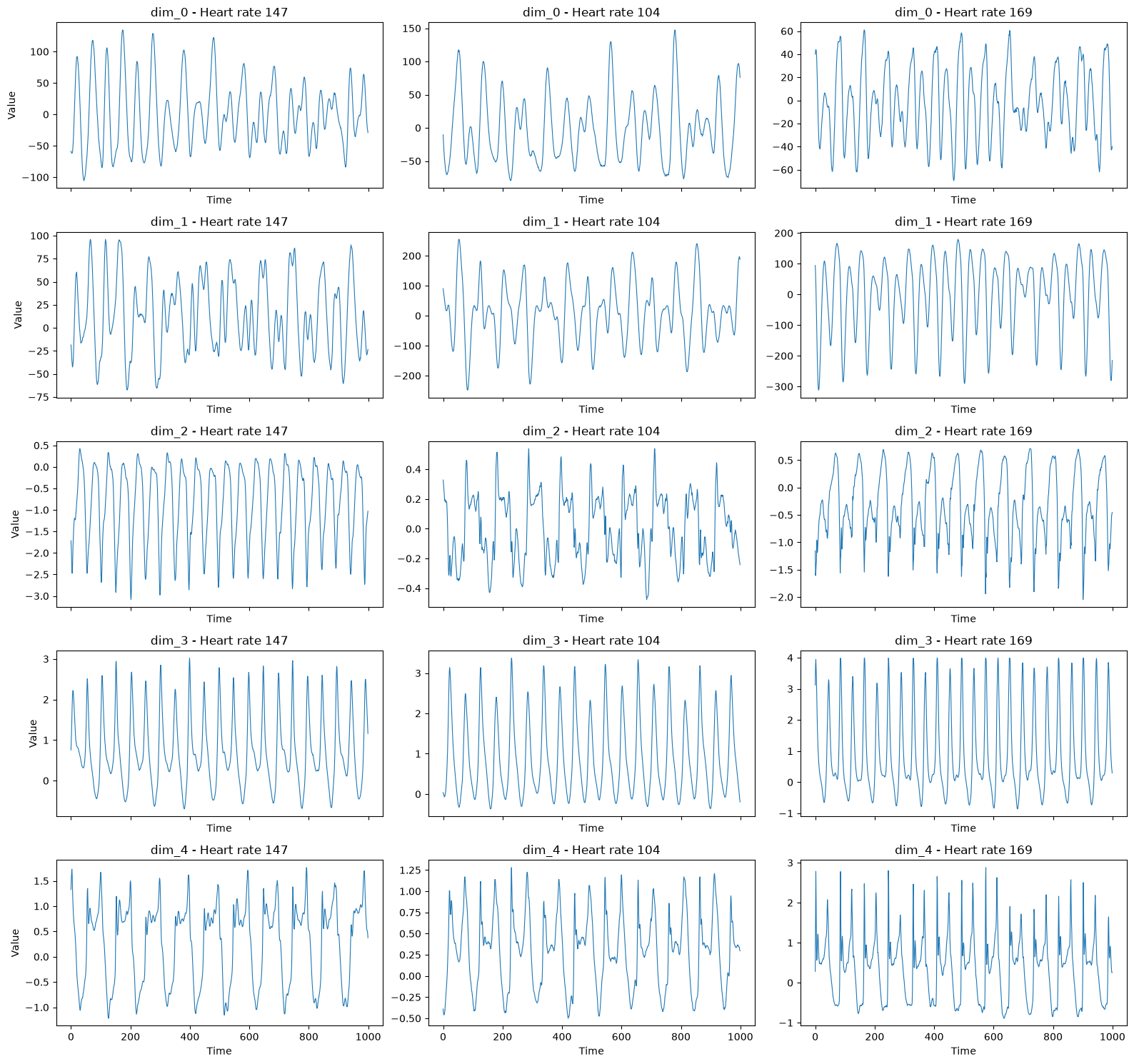
First we look at the raw training data. Each row corresponds to one sample in the dataset. The data comes in five columns, where each column represents a different signal source (PPG or acceleration signal). Note that each entry in the DataFrame is itself a time series.

X_train_raw
dim_0 dim_1 dim_2 dim_3 dim_4
0 0 -23.0 1 -24.0 2 -26.5 3 -27.... 0 4.0 1 6.0 2 3.0 3 3.... 0 -0.0702 1 -0.0702 2 -0.0546 3 ... 0 0.3432 1 0.3588 2 0.3666 3 ... 0 0.9594 1 0.9438 2 0.9360 3 ...
1 0 -20.5 1 -19.0 2 -20.0 3 -19.... 0 -37.0 1 -38.5 2 -40.5 3 -41.... 0 0.4056 1 0.4212 2 0.4368 3 ... 0 0.6084 1 0.6162 2 0.6084 3 ... 0 0.5148 1 0.4992 2 0.4758 3 ...
2 0 22.0 1 23.5 2 22.5 3 23.... 0 12.5 1 13.5 2 11.5 3 13.... 0 0.4758 1 0.4758 2 0.4758 3 ... 0 0.6864 1 0.6864 2 0.6864 3 ... 0 0.3900 1 0.3900 2 0.3978 3 ...
3 0 -5.5 1 -5.5 2 -6.5 3 -6.... 0 -1.0 1 -0.5 2 -1.5 3 -1.... 0 0.4602 1 0.4602 2 0.4602 3 ... 0 0.6708 1 0.6786 2 0.6708 3 ... 0 0.3978 1 0.4134 2 0.4056 3 ...
4 0 30.5 1 27.0 2 26.0 3 24.... 0 74.5 1 70.0 2 67.0 3 62.... 0 0.6162 1 0.6162 2 0.6240 3 ... 0 0.7098 1 0.6942 2 0.6786 3 ... 0 0.3978 1 0.3900 2 0.3744 3 ...
... ... ... ... ... ...
1763 0 130.0 1 142.5 2 148.0 3 ... 0 68.0 1 86.0 2 100.5 3 ... 0 -0.0858 1 -0.0936 2 -0.1092 3 ... 0 0.6084 1 0.6240 2 0.6162 3 ... 0 0.2340 1 0.2418 2 0.2418 3 ...
1764 0 -33.5 1 -36.0 2 -38.0 3 -38.... 0 32.0 1 26.0 2 21.0 3 18.... 0 -0.2340 1 -0.2418 2 -0.2262 3 ... 0 0.2496 1 0.2340 2 0.1872 3 ... 0 1.0998 1 1.1154 2 1.1076 3 ...
1765 0 -38.0 1 -41.5 2 -43.5 3 -44.... 0 21.5 1 15.5 2 11.0 3 7.... 0 -0.1716 1 -0.1638 2 -0.1560 3 ... 0 0.0156 1 0.0312 2 0.0546 3 ... 0 0.8034 1 0.8034 2 0.8034 3 ...
1766 0 111.5 1 100.5 2 85.5 3 ... 0 155.5 1 147.0 2 134.0 3 ... 0 -0.0780 1 -0.1092 2 -0.1326 3 ... 0 0.1794 1 0.1170 2 0.0624 3 ... 0 0.9594 1 0.9672 2 0.9438 3 ...
1767 0 66.5 1 59.5 2 51.5 3 44.... 0 95.5 1 90.0 2 84.0 3 77.... 0 0.1638 1 0.1716 2 0.1794 3 ... 0 0.3978 1 0.4134 2 0.4290 3 ... 0 0.7956 1 0.7800 2 0.7566 3 ...

1768 rows × 5 columns

y_train_raw
array([ 74.33920705,  76.35746606,  77.14285714, ..., 156.25      ,
       155.4404    , 154.0041    ], shape=(1768,))

To get a clearer picture, we can plot the signals of some of the training samples.

sampled = X_train_raw.sample(3, random_state=1337).sort_index()

fig, axes = plt.subplots(
    nrows=sampled.shape[1], ncols=3, figsize=(16, 3 * sampled.shape[1]), sharex=True
)

for row_idx, col in enumerate(sampled.columns):
    for col_idx, (i, row) in enumerate(sampled.iterrows()):
        axes[row_idx, col_idx].plot(row[col].values, label=f"Sample {i}", linewidth=0.8)
        axes[row_idx, col_idx].set_title(f"{col} - Heart rate {y_train_raw[i]:.0f}")
        axes[row_idx, col_idx].set_xlabel("Time")
    axes[row_idx, 0].set_ylabel("Value")

plt.tight_layout()
plt.show()

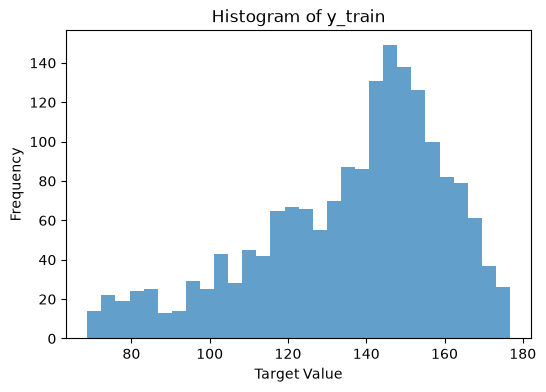
The following plot shows the distribution of the target values in the training set.

plt.figure(figsize=(6, 4))
plt.hist(y_train_raw, bins=30, alpha=0.7)
plt.xlabel("Target Value")
plt.ylabel("Frequency")
plt.title("Histogram of y_train")
plt.show()

To feed the data into the CNN, we first need to convert the dataframe into a so-called tensor (in this case a 3D array).

def convert_df_to_tensor(df: pd.DataFrame) -> np.ndarray:
    """Convert a DataFrame of time series to a 3D numpy tensor.

    Args:
        df: DataFrame where each cell contains a time series.

    Returns:
        3D array of shape (n_samples, ts_length, n_features).
    """
    tensor = np.array(
        [[df.iloc[i, j].values for j in range(df.shape[1])] for i in range(len(df))]
    )
    tensor = np.transpose(tensor, (0, 2, 1))

    for i, j in zip(range(len(df)), range(len(df.columns))):
        assert np.array_equal(df.iloc[i, j].values, tensor[i, :, j])

    return tensor


X_train_tensor = convert_df_to_tensor(X_train_raw)
X_test_tensor = convert_df_to_tensor(X_test_raw)

Let us check the shapes orf the resulting tensors.

print(X_train_tensor.shape)
print(X_test_tensor.shape)
(1768, 1000, 5)
(1328, 1000, 5)

The training data set has 1768 samples, each consisting of 5 channels (PPG and acceleration signals) with a length of 1000 time steps (which are 8 seconds at 125 Hz).

Neural networks are generally trained on normalized data. We will use a leaky ReLU activation function in our CNN, which works best with input data within a [0, 1] range.

Unfortunately the TimeSeriesScalerMinMax from tslearn needs the data in the shape (n_samples, n_timestamps, n_channels), while the CNN expects (n_samples, n_channels, n_timestamps), so we need to swap the last two axes again after scaling.

scaler_x = TimeSeriesScalerMinMax()
X_train = scaler_x.fit_transform(X_train_tensor, per_feature=True)
X_test = scaler_x.transform(X_test_tensor, per_feature=True)

scaler_y = MinMaxScaler()
y_train = scaler_y.fit_transform(y_train_raw.reshape(-1, 1))
y_test = scaler_y.transform(y_test_raw.reshape(-1, 1))

X_train = np.transpose(X_train, (0, 2, 1))
X_test = np.transpose(X_test, (0, 2, 1))
print(X_train.shape)
print(X_test.shape)
(1768, 5, 1000)
(1328, 5, 1000)

9.1.3 Regressor

The CNNRegressor from sktime can now be used to create and train the convolutional neural network for time series regression.

regressor = CNNRegressor(
    activation="linear",
    activation_hidden="leaky_relu",
    batch_size=64,
    metrics=[],
    n_conv_layers=5,
    n_epochs=80,
    optimizer=Adam(),
    random_state=42,
    verbose=True,
)

regressor.fit(X_train, y_train)
Model: "functional_1"
┏━━━━━━━━━━━━━━━━━━━━━━━━━━━━━━━━━┳━━━━━━━━━━━━━━━━━━━━━━━━┳━━━━━━━━━━━━━━━┓
┃ Layer (type)                    ┃ Output Shape           ┃       Param # ┃
┡━━━━━━━━━━━━━━━━━━━━━━━━━━━━━━━━━╇━━━━━━━━━━━━━━━━━━━━━━━━╇━━━━━━━━━━━━━━━┩
│ input_layer_1 (InputLayer)      │ (None, 1000, 5)        │             0 │
├─────────────────────────────────┼────────────────────────┼───────────────┤
│ conv1d_5 (Conv1D)               │ (None, 994, 6)         │           216 │
├─────────────────────────────────┼────────────────────────┼───────────────┤
│ average_pooling1d_5             │ (None, 331, 6)         │             0 │
│ (AveragePooling1D)              │                        │               │
├─────────────────────────────────┼────────────────────────┼───────────────┤
│ conv1d_6 (Conv1D)               │ (None, 325, 12)        │           516 │
├─────────────────────────────────┼────────────────────────┼───────────────┤
│ average_pooling1d_6             │ (None, 108, 12)        │             0 │
│ (AveragePooling1D)              │                        │               │
├─────────────────────────────────┼────────────────────────┼───────────────┤
│ conv1d_7 (Conv1D)               │ (None, 102, 12)        │         1,020 │
├─────────────────────────────────┼────────────────────────┼───────────────┤
│ average_pooling1d_7             │ (None, 34, 12)         │             0 │
│ (AveragePooling1D)              │                        │               │
├─────────────────────────────────┼────────────────────────┼───────────────┤
│ conv1d_8 (Conv1D)               │ (None, 28, 12)         │         1,020 │
├─────────────────────────────────┼────────────────────────┼───────────────┤
│ average_pooling1d_8             │ (None, 9, 12)          │             0 │
│ (AveragePooling1D)              │                        │               │
├─────────────────────────────────┼────────────────────────┼───────────────┤
│ conv1d_9 (Conv1D)               │ (None, 3, 12)          │         1,020 │
├─────────────────────────────────┼────────────────────────┼───────────────┤
│ average_pooling1d_9             │ (None, 1, 12)          │             0 │
│ (AveragePooling1D)              │                        │               │
├─────────────────────────────────┼────────────────────────┼───────────────┤
│ flatten_1 (Flatten)             │ (None, 12)             │             0 │
├─────────────────────────────────┼────────────────────────┼───────────────┤
│ dense_1 (Dense)                 │ (None, 1)              │            13 │
└─────────────────────────────────┴────────────────────────┴───────────────┘
 Total params: 3,805 (14.86 KB)
 Trainable params: 3,805 (14.86 KB)
 Non-trainable params: 0 (0.00 B)
Epoch 1/80

28/28 ━━━━━━━━━━━━━━━━━━━━ 3s 19ms/step - loss: 0.0801

Epoch 2/80

28/28 ━━━━━━━━━━━━━━━━━━━━ 1s 21ms/step - loss: 0.0457

Epoch 3/80

28/28 ━━━━━━━━━━━━━━━━━━━━ 1s 18ms/step - loss: 0.0435

Epoch 4/80

28/28 ━━━━━━━━━━━━━━━━━━━━ 1s 19ms/step - loss: 0.0415

Epoch 5/80

28/28 ━━━━━━━━━━━━━━━━━━━━ 0s 17ms/step - loss: 0.0387

Epoch 6/80

28/28 ━━━━━━━━━━━━━━━━━━━━ 1s 18ms/step - loss: 0.0369

Epoch 7/80

28/28 ━━━━━━━━━━━━━━━━━━━━ 1s 18ms/step - loss: 0.0357

Epoch 8/80

28/28 ━━━━━━━━━━━━━━━━━━━━ 1s 19ms/step - loss: 0.0344

Epoch 9/80

28/28 ━━━━━━━━━━━━━━━━━━━━ 1s 21ms/step - loss: 0.0336

Epoch 10/80

28/28 ━━━━━━━━━━━━━━━━━━━━ 1s 18ms/step - loss: 0.0320

Epoch 11/80

28/28 ━━━━━━━━━━━━━━━━━━━━ 1s 18ms/step - loss: 0.0310

Epoch 12/80

28/28 ━━━━━━━━━━━━━━━━━━━━ 1s 17ms/step - loss: 0.0297

Epoch 13/80

28/28 ━━━━━━━━━━━━━━━━━━━━ 1s 18ms/step - loss: 0.0282

Epoch 14/80

28/28 ━━━━━━━━━━━━━━━━━━━━ 0s 15ms/step - loss: 0.0265

Epoch 15/80

28/28 ━━━━━━━━━━━━━━━━━━━━ 0s 16ms/step - loss: 0.0236

Epoch 16/80

28/28 ━━━━━━━━━━━━━━━━━━━━ 0s 17ms/step - loss: 0.0222

Epoch 17/80

28/28 ━━━━━━━━━━━━━━━━━━━━ 1s 17ms/step - loss: 0.0205

Epoch 18/80

28/28 ━━━━━━━━━━━━━━━━━━━━ 0s 16ms/step - loss: 0.0191

Epoch 19/80

28/28 ━━━━━━━━━━━━━━━━━━━━ 0s 17ms/step - loss: 0.0179

Epoch 20/80

28/28 ━━━━━━━━━━━━━━━━━━━━ 0s 16ms/step - loss: 0.0170

Epoch 21/80

28/28 ━━━━━━━━━━━━━━━━━━━━ 1s 24ms/step - loss: 0.0162

Epoch 22/80

28/28 ━━━━━━━━━━━━━━━━━━━━ 1s 29ms/step - loss: 0.0154

Epoch 23/80

28/28 ━━━━━━━━━━━━━━━━━━━━ 1s 19ms/step - loss: 0.0148

Epoch 24/80

28/28 ━━━━━━━━━━━━━━━━━━━━ 1s 21ms/step - loss: 0.0143

Epoch 25/80

28/28 ━━━━━━━━━━━━━━━━━━━━ 0s 16ms/step - loss: 0.0138

Epoch 26/80

28/28 ━━━━━━━━━━━━━━━━━━━━ 1s 17ms/step - loss: 0.0132

Epoch 27/80

28/28 ━━━━━━━━━━━━━━━━━━━━ 0s 17ms/step - loss: 0.0130

Epoch 28/80

28/28 ━━━━━━━━━━━━━━━━━━━━ 1s 17ms/step - loss: 0.0125

Epoch 29/80

28/28 ━━━━━━━━━━━━━━━━━━━━ 1s 17ms/step - loss: 0.0123

Epoch 30/80

28/28 ━━━━━━━━━━━━━━━━━━━━ 0s 16ms/step - loss: 0.0120

Epoch 31/80

28/28 ━━━━━━━━━━━━━━━━━━━━ 1s 18ms/step - loss: 0.0118

Epoch 32/80

28/28 ━━━━━━━━━━━━━━━━━━━━ 1s 17ms/step - loss: 0.0115

Epoch 33/80

28/28 ━━━━━━━━━━━━━━━━━━━━ 1s 18ms/step - loss: 0.0112

Epoch 34/80

28/28 ━━━━━━━━━━━━━━━━━━━━ 0s 16ms/step - loss: 0.0111

Epoch 35/80

28/28 ━━━━━━━━━━━━━━━━━━━━ 0s 17ms/step - loss: 0.0108

Epoch 36/80

28/28 ━━━━━━━━━━━━━━━━━━━━ 0s 16ms/step - loss: 0.0106

Epoch 37/80

28/28 ━━━━━━━━━━━━━━━━━━━━ 0s 15ms/step - loss: 0.0104

Epoch 38/80

28/28 ━━━━━━━━━━━━━━━━━━━━ 0s 17ms/step - loss: 0.0103

Epoch 39/80

28/28 ━━━━━━━━━━━━━━━━━━━━ 0s 15ms/step - loss: 0.0101

Epoch 40/80

28/28 ━━━━━━━━━━━━━━━━━━━━ 0s 16ms/step - loss: 0.0099

Epoch 41/80

28/28 ━━━━━━━━━━━━━━━━━━━━ 0s 16ms/step - loss: 0.0097

Epoch 42/80

28/28 ━━━━━━━━━━━━━━━━━━━━ 1s 17ms/step - loss: 0.0096

Epoch 43/80

28/28 ━━━━━━━━━━━━━━━━━━━━ 1s 22ms/step - loss: 0.0095

Epoch 44/80

28/28 ━━━━━━━━━━━━━━━━━━━━ 0s 17ms/step - loss: 0.0093

Epoch 45/80

28/28 ━━━━━━━━━━━━━━━━━━━━ 0s 16ms/step - loss: 0.0092

Epoch 46/80

28/28 ━━━━━━━━━━━━━━━━━━━━ 1s 20ms/step - loss: 0.0091

Epoch 47/80

28/28 ━━━━━━━━━━━━━━━━━━━━ 0s 16ms/step - loss: 0.0090

Epoch 48/80

28/28 ━━━━━━━━━━━━━━━━━━━━ 0s 17ms/step - loss: 0.0088

Epoch 49/80

28/28 ━━━━━━━━━━━━━━━━━━━━ 0s 15ms/step - loss: 0.0087

Epoch 50/80

28/28 ━━━━━━━━━━━━━━━━━━━━ 0s 16ms/step - loss: 0.0086

Epoch 51/80

28/28 ━━━━━━━━━━━━━━━━━━━━ 0s 15ms/step - loss: 0.0085

Epoch 52/80

28/28 ━━━━━━━━━━━━━━━━━━━━ 0s 17ms/step - loss: 0.0084

Epoch 53/80

28/28 ━━━━━━━━━━━━━━━━━━━━ 0s 15ms/step - loss: 0.0083

Epoch 54/80

28/28 ━━━━━━━━━━━━━━━━━━━━ 0s 16ms/step - loss: 0.0082

Epoch 55/80

28/28 ━━━━━━━━━━━━━━━━━━━━ 0s 15ms/step - loss: 0.0081

Epoch 56/80

28/28 ━━━━━━━━━━━━━━━━━━━━ 0s 16ms/step - loss: 0.0080

Epoch 57/80

28/28 ━━━━━━━━━━━━━━━━━━━━ 0s 15ms/step - loss: 0.0079

Epoch 58/80

28/28 ━━━━━━━━━━━━━━━━━━━━ 1s 18ms/step - loss: 0.0078

Epoch 59/80

28/28 ━━━━━━━━━━━━━━━━━━━━ 0s 15ms/step - loss: 0.0077

Epoch 60/80

28/28 ━━━━━━━━━━━━━━━━━━━━ 0s 16ms/step - loss: 0.0075

Epoch 61/80

28/28 ━━━━━━━━━━━━━━━━━━━━ 0s 16ms/step - loss: 0.0074

Epoch 62/80

28/28 ━━━━━━━━━━━━━━━━━━━━ 0s 16ms/step - loss: 0.0073

Epoch 63/80

28/28 ━━━━━━━━━━━━━━━━━━━━ 1s 20ms/step - loss: 0.0072

Epoch 64/80

28/28 ━━━━━━━━━━━━━━━━━━━━ 1s 18ms/step - loss: 0.0071

Epoch 65/80

28/28 ━━━━━━━━━━━━━━━━━━━━ 0s 17ms/step - loss: 0.0070

Epoch 66/80

28/28 ━━━━━━━━━━━━━━━━━━━━ 1s 19ms/step - loss: 0.0070

Epoch 67/80

28/28 ━━━━━━━━━━━━━━━━━━━━ 0s 16ms/step - loss: 0.0069

Epoch 68/80

28/28 ━━━━━━━━━━━━━━━━━━━━ 0s 15ms/step - loss: 0.0069

Epoch 69/80

28/28 ━━━━━━━━━━━━━━━━━━━━ 0s 17ms/step - loss: 0.0068

Epoch 70/80

28/28 ━━━━━━━━━━━━━━━━━━━━ 0s 17ms/step - loss: 0.0068

Epoch 71/80

28/28 ━━━━━━━━━━━━━━━━━━━━ 0s 16ms/step - loss: 0.0067

Epoch 72/80

28/28 ━━━━━━━━━━━━━━━━━━━━ 0s 17ms/step - loss: 0.0066

Epoch 73/80

28/28 ━━━━━━━━━━━━━━━━━━━━ 1s 17ms/step - loss: 0.0066

Epoch 74/80

28/28 ━━━━━━━━━━━━━━━━━━━━ 0s 16ms/step - loss: 0.0065

Epoch 75/80

28/28 ━━━━━━━━━━━━━━━━━━━━ 0s 16ms/step - loss: 0.0065

Epoch 76/80

28/28 ━━━━━━━━━━━━━━━━━━━━ 0s 16ms/step - loss: 0.0064

Epoch 77/80

28/28 ━━━━━━━━━━━━━━━━━━━━ 0s 17ms/step - loss: 0.0064

Epoch 78/80

28/28 ━━━━━━━━━━━━━━━━━━━━ 0s 17ms/step - loss: 0.0063

Epoch 79/80

28/28 ━━━━━━━━━━━━━━━━━━━━ 0s 17ms/step - loss: 0.0063

Epoch 80/80

28/28 ━━━━━━━━━━━━━━━━━━━━ 0s 15ms/step - loss: 0.0062
CNNRegressor(activation_hidden='leaky_relu', batch_size=64, metrics=[],
             n_conv_layers=5, n_epochs=80,
             optimizer=<keras.src.optimizers.adam.Adam object at 0x7bcda30b1d10>,
             random_state=42, verbose=True)
Please rerun this cell to show the HTML repr or trust the notebook.

To verify the performance of the trained model, we now predict the target values for the test set and compute the root mean squared error (RMSE) between the predicted and true target values.

Keep in mind, that we have to inverse transform the predicted target values back to the original scale before computing the RMSE.

y_pred_scaled = regressor.predict(X_test)
y_pred = scaler_y.inverse_transform(y_pred_scaled.reshape(-1, 1))

rmse = root_mean_squared_error(y_test_raw, y_pred)
print(f"RMSE: {rmse:.4f}")
21/21 ━━━━━━━━━━━━━━━━━━━━ 0s 11ms/step

RMSE: 28.2592

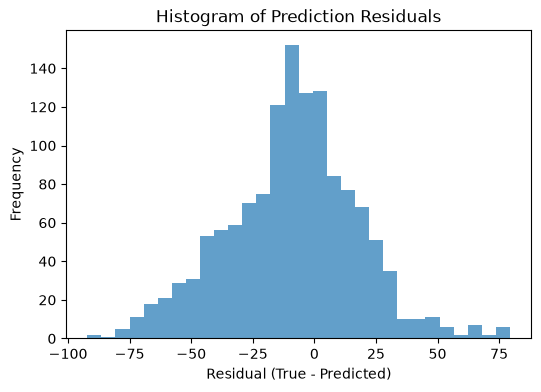
The RMSE indicates that the model is not performing very well on this task.

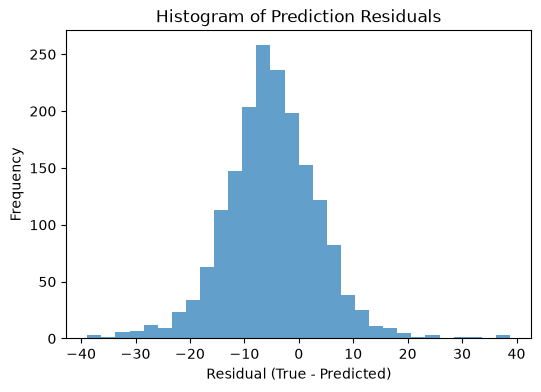
Let us visualize the residuals (the difference between the true and predicted target values) to get a better understanding of the model’s performance.

plt.figure(figsize=(6, 4))
plt.hist(y_test_raw - y_pred.flatten(), bins=30, alpha=0.7)
plt.xlabel("Residual (True - Predicted)")
plt.ylabel("Frequency")
plt.title("Histogram of Prediction Residuals")
plt.show()

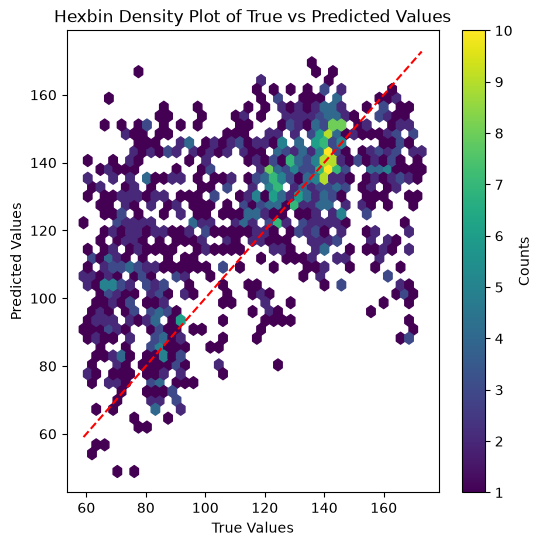
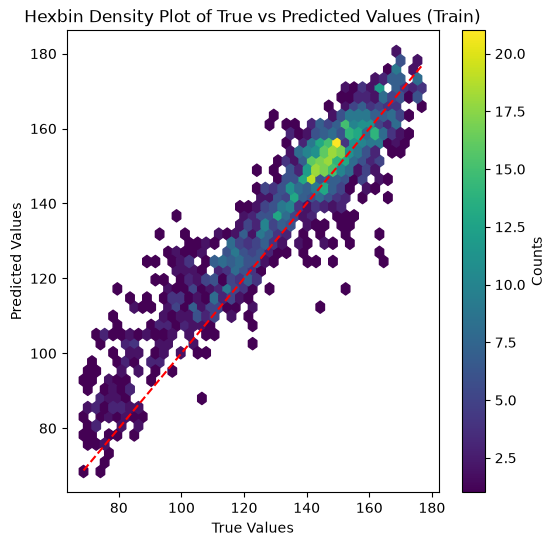
A scatter plot showing true against predicted values reveals that the model tends to overestimate smaller values and underestimate larger values.

plt.figure(figsize=(6, 6))
plt.hexbin(y_test_raw, y_pred.flatten(), gridsize=40, cmap="viridis", mincnt=1)
plt.xlabel("True Values")
plt.ylabel("Predicted Values")
plt.title("Hexbin Density Plot of True vs Predicted Values")
plt.plot(
    [y_test_raw.min(), y_test_raw.max()], [y_test_raw.min(), y_test_raw.max()], "r--"
)
plt.colorbar(label="Counts")
plt.show()

Especially when encountering a model that performs worse than expected, it is important to analyze potential reasons for this behavior.

Here, we predict the training set using the trained model. Usually, the training error should be significantly lower than the test error. If this is not the case, we can suspect issues with the code, model (architecture) or with the data itself.

Plotting the histogram of residuals on training set

y_pred_train_scaled = regressor.predict(X_train)
y_pred_train = scaler_y.inverse_transform(y_pred_train_scaled.reshape(-1, 1))

plt.figure(figsize=(6, 4))
plt.hist(y_train_raw - y_pred_train.flatten(), bins=30, alpha=0.7)
plt.xlabel("Residual (True - Predicted)")
plt.ylabel("Frequency")
plt.title("Histogram of Prediction Residuals")
plt.show()
28/28 ━━━━━━━━━━━━━━━━━━━━ 0s 7ms/step

Plotting the scatter plot of true vs. predicted values on training set

plt.figure(figsize=(6, 6))
plt.hexbin(y_train_raw, y_pred_train.flatten(), gridsize=40, cmap="viridis", mincnt=1)
plt.xlabel("True Values")
plt.ylabel("Predicted Values")
plt.title("Hexbin Density Plot of True vs Predicted Values (Train)")
plt.plot(
    [y_train_raw.min(), y_train_raw.max()],
    [y_train_raw.min(), y_train_raw.max()],
    "r--",
)
plt.colorbar(label="Counts")
plt.show()

The model is able to fit the training data quite well, indicating that the code is implemented correctly and the model architecture is complex enough to capture the underlying patterns in the data. Still, the performance on the test set is significantly worse than on the training set. This suggests that the model is likely overfitting the data, which could be due to various factors such as e.g. insufficient training data, or lack of regularization or that the test data distribution differs significantly from the training data distribution.

While these results are not fully satisfying, the results align with those reported by Tan et al. (2021) for other simpler neural network architectures on this dataset.