import pandas as pd  # used for data handling
import plotly.io as pio  # used to set the default plotly renderer
import seaborn as sns  # used for statistical data visualization

pio.renderers.default = (
    "notebook"  # set the default plotly renderer to "notebook" (necessary for quarto to render the plots)
)21 Process optimization via Live Feedback
In this section, we will have a look at a simulated example of a live feedback system in an industrial manufacturing context.
21.1 Setting the stage
Imagine a pick-and-place machine in a manufacturing line that is responsible for placing components onto a circuit board. The machine has two axes (X and Y) to position the placement head accurately over the board and a vacuum system to pick up and release components. Additionally it has a camera system to verify the placement accuracy of each component once it is placed. A couple of sensors provide real-time measurements and variables that can be used to monitor the process.
Unfortunately, the machine seems to be experiencing some issues with placement accuracy, leading to an increased number of defective boards. To address this, the engineers set up sandboxing mode where the machine performs four steps:
- Move to pick up a component with random weight placed at a random location.
- Pick up the component using the vacuum system.
- Move to the target placement location on the circuit board with random speed. This is always at the center of the board at (150, 150).
- Place the component and measure the placement accuracy using the camera system.
Until the end of step 2, it is possible to adjust the placement parameters by providing a correction vector that modifies the target placement location.
The goal is to optimize the placement parameters in real-time based on the feedback received from the camera system after each placement.
21.2 Accessible variables
The following variables are accessible during the process:
Air temperature [K]: ambient temperature around the machine.Attached Weight [mg]: weight of the component picked up by the vacuum system.Cycle: unique identifier for each cycle.Error x [mm]: placement error in \(x\) direction (only available at the end of the cycle).Error y [mm]: placement error in \(y\) direction (only available at the end of the cycle).Position x [mm]: target position in \(x\) direction.Position y [mm]: target position in \(y\) direction.Process step: current step in the process (0 to 3).Process temperature [K]: temperature inside the machine.Speed [mm/s]: speed of the current movement.Speed next [mm/s]: speed for the next movement.
21.3 Data
One cycle usually takes 3-6 seconds to complete and the sensor data is available in realtime via OPC Unified Architecture (OPC UA).
Note
OPC UA is a cross-platform, open-source communication protocol for data exchange in the industrial automation space developed by the OPC Foundation. It is a client-server architecture that allows for secure and reliable data transfer between devices and systems from different manufacturers.
Luckily, the engineers already collected a dataset of 25.000 cycles coming in two files:
simulated_opcua_machinedata.csvstores the sensor data.simulated_opcua_postinspection.csvstores the placement error data.
The two datasets can be merged via cycle column.
21.4 Loading packages
21.5 Loading the dataset
The dataset was released alongside the simulated machine at Ehrensperger (2026), but you can also clone the repository directly from GitHub. In this section, we will look at the provided csv files.
df_machinedata = pd.read_csv(
    "https://raw.githubusercontent.com/noxthot/industrial_datascience_live_machine/refs/tags/v1.0.0/data/simulated_opcua_machinedata.csv"
)
df_postinspection = pd.read_csv(
    "https://raw.githubusercontent.com/noxthot/industrial_datascience_live_machine/refs/tags/v1.0.0/data/simulated_opcua_postinspection.csv"
)
21.5.1 Data integrity check
df_machinedata| Air temperature [K] | Attached Weight [mg] | Position x [mm] | Position y [mm] | Process step | Process temperature [K] | Speed [mm/s] | Speed next [mm/s] | timestamp | cycle | |
|---|---|---|---|---|---|---|---|---|---|---|
| 0 | 24.755379 | 0.000000 | 191.828040 | 7.503227 | 0 | 30.385614 | 100.000000 | 0.000000 | 2026-01-08T13:37:00 | 1 |
| 1 | 25.215286 | 223.987527 | 191.828040 | 7.503227 | 1 | 31.615630 | 0.000000 | 34.752639 | 2026-01-08T13:37:01.505090 | 1 |
| 2 | 24.666009 | 223.987527 | 150.000000 | 150.000000 | 2 | 31.998852 | 34.752639 | 0.000000 | 2026-01-08T13:37:02.025090 | 1 |
| 3 | 25.115265 | 0.000000 | 150.000000 | 150.000000 | 3 | 33.046526 | 0.000000 | 100.000000 | 2026-01-08T13:37:06.318405 | 1 |
| 4 | 25.129309 | 0.000000 | 7.960791 | 59.651295 | 0 | 33.194048 | 100.000000 | 0.000000 | 2026-01-08T13:37:06.338405 | 2 |
| ... | ... | ... | ... | ... | ... | ... | ... | ... | ... | ... |
| 99995 | 8.068273 | 0.000000 | 150.000000 | 150.000000 | 3 | 17.642248 | 0.000000 | 100.000000 | 2026-01-09T21:57:12.230277 | 24999 |
| 99996 | 10.301384 | 0.000000 | 273.977920 | 126.801859 | 0 | 16.803874 | 100.000000 | 0.000000 | 2026-01-09T21:57:12.250277 | 25000 |
| 99997 | 9.924715 | 193.867063 | 273.977920 | 126.801859 | 1 | 16.295092 | 0.000000 | 27.812182 | 2026-01-09T21:57:13.531573 | 25000 |
| 99998 | 9.452700 | 193.867063 | 150.000000 | 150.000000 | 2 | 16.074561 | 27.812182 | 0.000000 | 2026-01-09T21:57:14.051573 | 25000 |
| 99999 | 10.116288 | 0.000000 | 150.000000 | 150.000000 | 3 | 17.222515 | 0.000000 | 100.000000 | 2026-01-09T21:57:18.606622 | 25000 |
100000 rows × 10 columns
df_postinspection| cycle | error_x | error_y | |
|---|---|---|---|
| 0 | 1 | -0.192236 | 0.654895 |
| 1 | 2 | 1.285577 | 0.817733 |
| 2 | 3 | -0.456091 | 0.163004 |
| 3 | 4 | -1.734704 | -0.624146 |
| 4 | 5 | -0.496285 | 0.494395 |
| ... | ... | ... | ... |
| 24995 | 24996 | 1.080388 | 2.691526 |
| 24996 | 24997 | -0.566057 | -0.794911 |
| 24997 | 24998 | -0.580030 | 0.738004 |
| 24998 | 24999 | 0.773854 | -1.404837 |
| 24999 | 25000 | -0.842577 | 0.157659 |
25000 rows × 3 columns
df = df_machinedata.merge(df_postinspection, on="cycle", how="left")
df| Air temperature [K] | Attached Weight [mg] | Position x [mm] | Position y [mm] | Process step | Process temperature [K] | Speed [mm/s] | Speed next [mm/s] | timestamp | cycle | error_x | error_y | |
|---|---|---|---|---|---|---|---|---|---|---|---|---|
| 0 | 24.755379 | 0.000000 | 191.828040 | 7.503227 | 0 | 30.385614 | 100.000000 | 0.000000 | 2026-01-08T13:37:00 | 1 | -0.192236 | 0.654895 |
| 1 | 25.215286 | 223.987527 | 191.828040 | 7.503227 | 1 | 31.615630 | 0.000000 | 34.752639 | 2026-01-08T13:37:01.505090 | 1 | -0.192236 | 0.654895 |
| 2 | 24.666009 | 223.987527 | 150.000000 | 150.000000 | 2 | 31.998852 | 34.752639 | 0.000000 | 2026-01-08T13:37:02.025090 | 1 | -0.192236 | 0.654895 |
| 3 | 25.115265 | 0.000000 | 150.000000 | 150.000000 | 3 | 33.046526 | 0.000000 | 100.000000 | 2026-01-08T13:37:06.318405 | 1 | -0.192236 | 0.654895 |
| 4 | 25.129309 | 0.000000 | 7.960791 | 59.651295 | 0 | 33.194048 | 100.000000 | 0.000000 | 2026-01-08T13:37:06.338405 | 2 | 1.285577 | 0.817733 |
| ... | ... | ... | ... | ... | ... | ... | ... | ... | ... | ... | ... | ... |
| 99995 | 8.068273 | 0.000000 | 150.000000 | 150.000000 | 3 | 17.642248 | 0.000000 | 100.000000 | 2026-01-09T21:57:12.230277 | 24999 | 0.773854 | -1.404837 |
| 99996 | 10.301384 | 0.000000 | 273.977920 | 126.801859 | 0 | 16.803874 | 100.000000 | 0.000000 | 2026-01-09T21:57:12.250277 | 25000 | -0.842577 | 0.157659 |
| 99997 | 9.924715 | 193.867063 | 273.977920 | 126.801859 | 1 | 16.295092 | 0.000000 | 27.812182 | 2026-01-09T21:57:13.531573 | 25000 | -0.842577 | 0.157659 |
| 99998 | 9.452700 | 193.867063 | 150.000000 | 150.000000 | 2 | 16.074561 | 27.812182 | 0.000000 | 2026-01-09T21:57:14.051573 | 25000 | -0.842577 | 0.157659 |
| 99999 | 10.116288 | 0.000000 | 150.000000 | 150.000000 | 3 | 17.222515 | 0.000000 | 100.000000 | 2026-01-09T21:57:18.606622 | 25000 | -0.842577 | 0.157659 |
100000 rows × 12 columns
21.6 Error Visualization
sns.jointplot(data=df_postinspection, x="error_x", y="error_y", kind="kde", fill=True, cmap="viridis")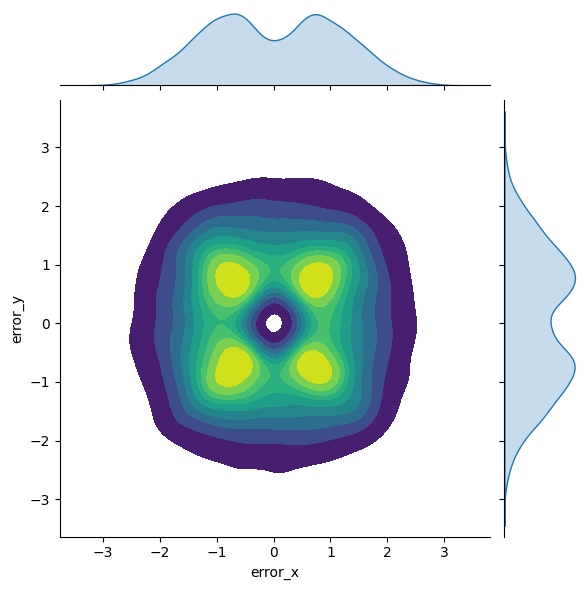
This is a rather interesting error distribution.
21.7 Next Steps
Chapter 23 will guide you through the optimization process aimed at reducing these errors and improving overall process accuracy.